I recently bought a new Laptop with Windows Vista Home Premium pre-installed, before buying it I read a lot of reviews about Vista, its bad sides and its good sides.

A lot of people complained about Vista and hardware incompatibility, I didn’t have this problem since my Laptop is preloaded with vista so everything was compatible, another problem a lot of people complained about is vista’s memory usage, well that’s true vista uses a lot of memory so buying it with 512MB of RAM (Microsoft official minimum requirement) will certainly give you problems, I have 2GB of RAM so I have no problem in memory usage but I have a sidebar gadget that always shows me the amount of RAM used, when I power up the PC it’s usually around 32-37% (I have a lot of Toshiba stuff running in the background) I work on a lot of stuff together (Firefox, VB.NET express, Photoshop CS2 are running simultaneously many times) and I never fill the RAMs (53% now with the apps mentioned above and MS Office Word 2007) so I recommend 1,5GB of RAM and more if you want to get Vista running smoothly.
Some of the other problems with Vista are software incompatibilities, and well to be honest Microsoft can’t do anything about it, the software makers have to update the applications they make, another problem was moving files in Vista! It used to take 5 minutes to move a 5MB folder because all what windows was doing is calculating the remaining time instead of moving the file, Microsoft issued a fix for this bug a week ago and moving files is a lot easier now.
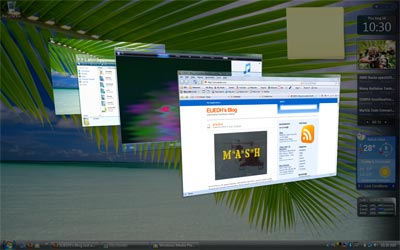
One great thing about Vista is its ease of use and nice graphical interface (Aero).
Searching in Vista is great! All the files are indexed so finding a file takes just seconds and the files start to appear as you type your search, Searching in vista is the easier way to get somewhere so you get a search box in every corner, You have a search box in every file explorer so finding a document in a folder with 1000 files takes a second, there is a search box in the start menu too, so instead of searching in the huge list of programs you just type the first characters and Vista shows you the program you are looking for. Searching is also made easier with tagging, so you can tag any file you have with many words and when you search the files those words make the document easier to find (very handy for pictures).
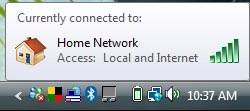 Another good feature in Vista is the networking, it connects and configures everything for you, that’s a very helpful feature for beginners, when I first got the laptop and connected it via LAN to the internet it detected the settings and I had internet immediately, the same connection needed configuration in XP, I bought a wireless router after that and connecting wirelessly to the router was also very easy. The only bad side about networking in Vista is advanced stuff are harder to reach. I have a shared Hard Drive on one PC and in XP all we had to do is find the computer the drive is connected to and access the drive, in Vista I had to manually type the HDD location on the network to access it.
Here’s a list of some other features worth mentioning in Vista:
- Windows Photo Gallery, All your photos are shows and grouped in a nice easy interface you can navigate, you can also edit the pictures to fix Red Eyes and similar mistakes.

- Windows Speech Recognition, similar to the one that was available in MS Office, but it now covers the whole OS, easy to use but not always accurate.
- Windows DVD Maker, make your DVDs from windows.
- Windows Movie Maker, an improved version similar to the previous ones
- Windows Calendar, Organize your schedule from windows! It used to crash after the reboot when you add a new appointment, but it’s now fixed.
- Windows Meeting Space, A new and improved Windows Net Meeting, I didn’t try it yet but they say it’s nice and easy to use.