Computers

The Softwares Room

A friend of mine recently started a blog about softwares. The blog is always updated with new and useful softwares organized into different categories. Every post contains a small description of the software in question and a download link. All the softwares are legal and the site doesn’t offer any pirated content.

In addition to the softwares you can also find pluggins to various programs (Firefox…) and some useful tips and tricks. Check out the site here and don’t hesitate to contact them if you have any software related question. I am sure they can help!

Microsoft Student Festival

I Won!!

Today Microsoft was having the first Microsoft Student Festival in my university. The festival is actually a small exposition by some sponsors, followed by a presentation about Microsoft and the future of computers and finally a draw takes place and one student wins a lot of prices! And in USJ that student was me!!! I won!!! :D

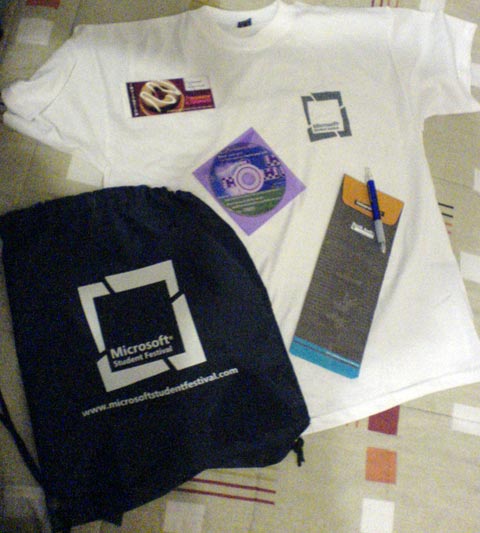
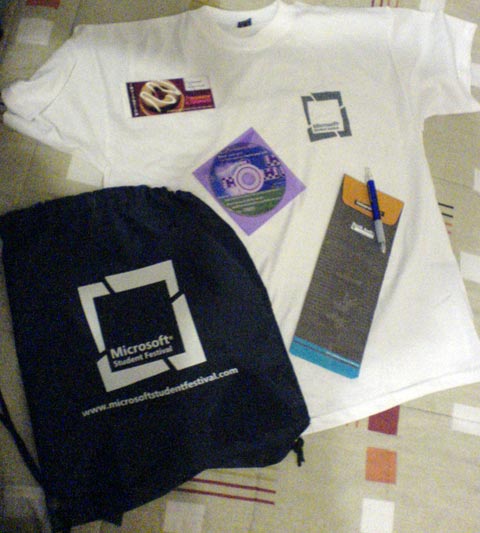
In addition to the prizes I won, another student got a free training courses and we all received a bag from Microsoft containing a T-Shirt a Dunkin-Donuts free coffe coupon and a VB.NET 2008 Express CD.

Microsoft Student Festival

 Microsoft Student Festival gifts

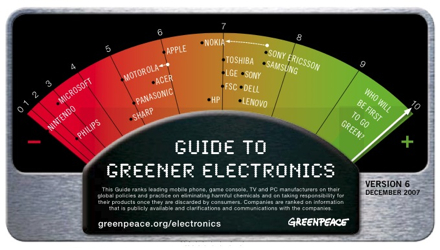
Green Peace Guide to Greener Electronics

My Electronics are Green

Green Peace Guide to Greener Electronics

I was checking Greenpeace’s “Guide to greener electronics” and apparently the stuff I own are made by a bunch of green companies. My cell phone is a Sony Ericsson with 7.7/10, my laptop is a Toshiba with a 7/10 and the DVD player and surround system in my room are from LG with a 7/10 too. The other electronics in the house are mostly from green companies too so I am glad I have little negative on the environment!

Via Engadget 

How to transfer your MSN messenger emoticons from one PC to another

A couple of months ago I got a Laptop and moved everything from my desktop to it, the only stuff I couldn’t move were my custom MSN messenger emoticons. I tried to enter via another username to the other PCs messenger and send the emoticons manualy but it didn’t work since each user has its own emoticon collection.

Yesterday I found a little tool that does half the job for me, this wizard (direct download link) will extract emoticons, display pictures and background from any MSN account you want and put them in a folder you select. You still have to manually re-create every emoticon but it’s better than nothing!

The Future?

I just watched this weird Flash presentation predicting the future of computers, the internet and its user. The presentation is a mix of history and fiction starting in the 90s and ending in 2014 (I think fiction starts in 2004). What’s really weird is that this is actually currently happening and we are all helping turning this fiction into a reality.

Cedar Linux

Cedar Linux, a Lebanese Linux Distro

Cedar Linux

A group of developers started working on a Lebanese Linux distribution, the Distro is not available yet but work is in progress so you can help in many ways, you can donate money, write help files, design graphics or of course do some programing.

We have a lot of good developers in Lebanon so the first Lebanese OS should be great. The list of build in applications is impressive and includes everything you currently use in your windows or mac. They are even going to include wine so you can run most of the windows applications on Linux.

Check the project website for more info.